Delete Users (Disable Login)
Introduction
In order to keep an audit trail of what happens to data in Flywheel, user accounts cannot be deleted. Instead, you can disable login for the user. Disabling a user means:
- Flywheel invalidates the user's active authentication tokens, signs the user out of all open browser sessions, and returns each session to the login screen
- The user can no longer sign in
- All group and project permissions for the user are removed
- The user is hidden by default in the app
- All logs of the user's actions in Flywheel remain in the logs
Instruction Steps
To disable a user:
- Sign in to Flywheel
- Click Users
- Search for the user by Name or Email Address
- Select the user
-
In the Information tab, click Login Disabled
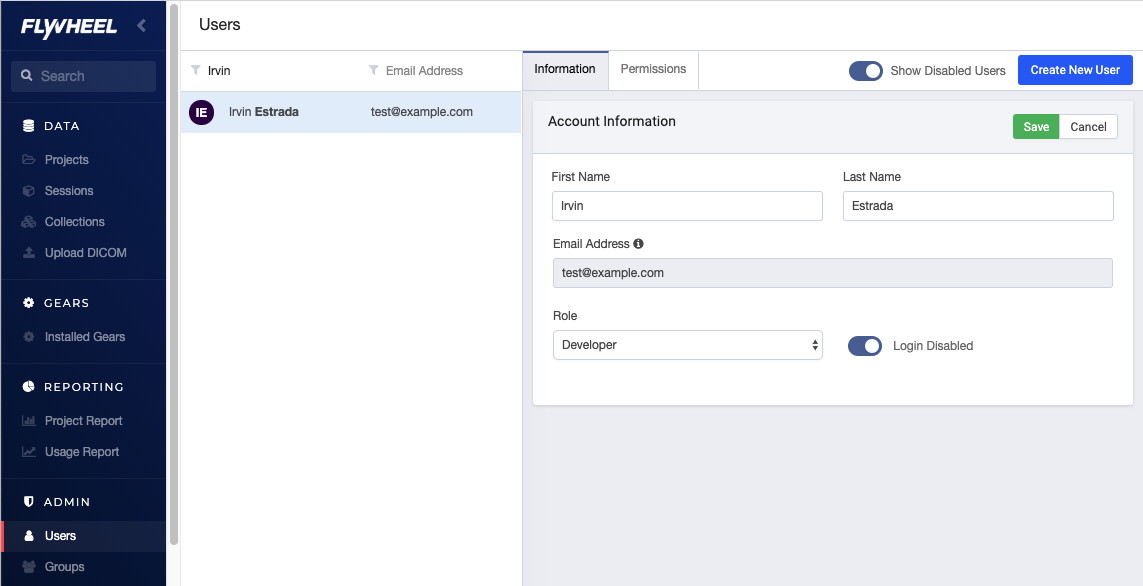
-
Confirm you want to disable login.
- Click Save.
The user disappears from the users list. If you want to see the user in the list later, click Show Disabled Users.